Who it suits
Cool and neutral undertones, and red or copper natural hair for a bold contrast. Try it if blue feels too cold.
Emerald is a deep teal-green jewel tone: rich rather than neon. It looks dramatic on light hair and like an oil-slick glint on dark hair. See it on your own hair in seconds, before anyone opens a tube of dye.
Free · no sign-up · the photo stays on your device

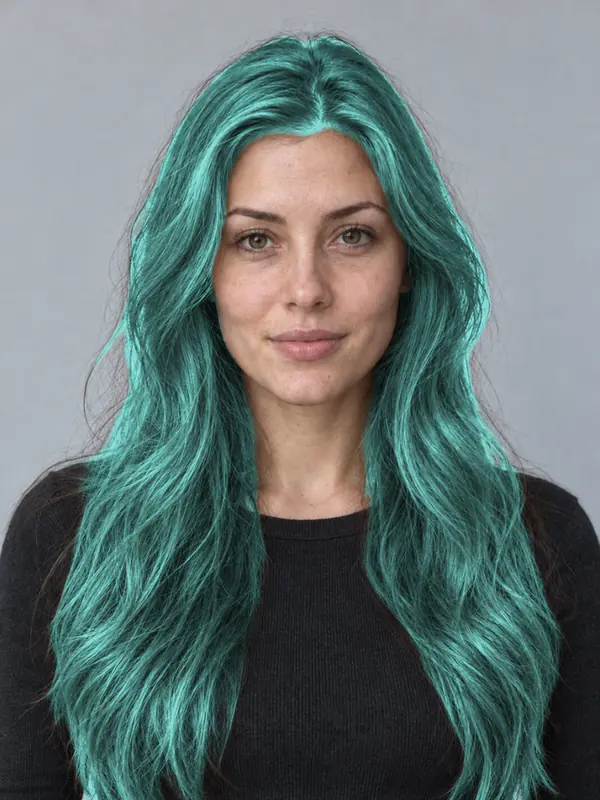
Cool and neutral undertones, and red or copper natural hair for a bold contrast. Try it if blue feels too cold.
A semi-permanent green-teal over hair lightened to about level 8. On darker hair, ask for a tinted gloss for a subtle glow.
Greens fade towards a softer mint. Cool water and a green or teal colour conditioner keep it rich.
Open the studio and add a portrait in even light with your hair in the frame, or use the demo.
Open More tools, then Hair, and pick Emerald from the vivid shades.
Set the intensity, drag the line between before and after, and save the card for your colourist.
Greens and blues can stain lightened hair. Ask your colourist about removal before you commit.
Emerald is greener and a little warmer; blue is cooler. Compare both on your photo.
Take it as a direction, not a promise. The salon result depends on your current colour, your hair’s condition, the products and your colourist, and the light in your photo changes how a shade reads.
The demo model is an AI-generated photo. Previews are made in the studio on your device and show a direction, not a guaranteed salon result.